Local AI · $0 · no API key

Baumeister AI.

A free AI website builder that runs on your own computer. A language model trained by Baumeister from the open-source Qwen3.5, running in the llama.cpp engine on your Windows PC, Mac or Raspberry Pi, writes and changes your website when you ask in plain words. Requests and site content are processed on your device and are not sent to Baumeister or any AI company.

$0. No account, no API key, no per-request charge. Slower than cloud AI: Baumeister measures the speed on your computer and shows it before every request.

Download Baumeister free
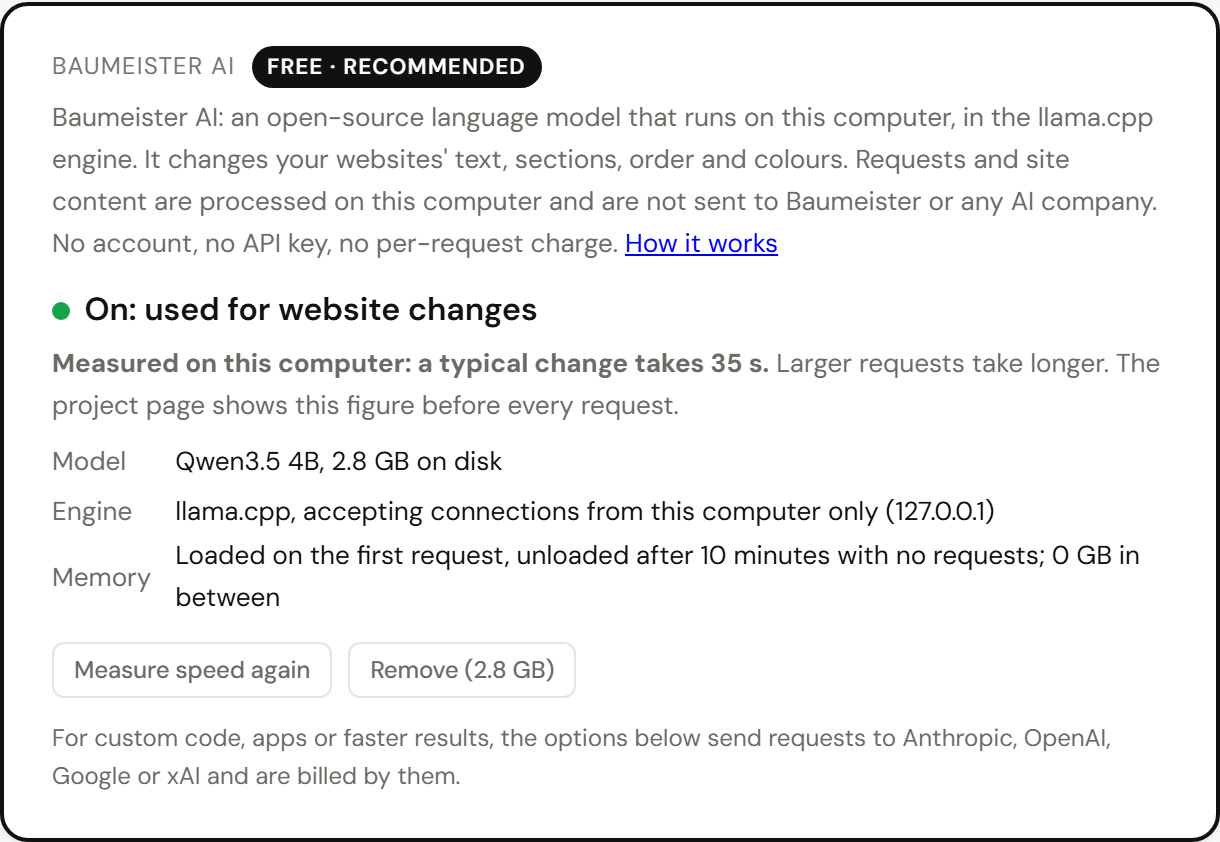
Baumeister AI in Settings: on, free, with the typical change time measured on this computer
// what it is

What Baumeister AI is

ModelBaumeister AI, trained by Baumeister from Qwen3.5 0.8B (open source under the Apache 2.0 licence) to make site edits; 4-bit quantised, 535 MB. Computers that already set up the earlier 4B model keep using it.
Enginellama.cpp (llama-server), open source under the MIT licence, running as a local process that accepts connections from your computer only (127.0.0.1).
What it doesChanges a website's words, prices, colours and sections from a request in plain words, and writes new sites from Baumeister’s templates.
Where it runsThe Baumeister app on Windows 10 or 11 and on Macs with Apple silicon. No graphics card needed.
Cost$0. It uses your computer's processor and memory, so Baumeister has no per-request cost to pass on.
// how it works

What happens when you ask

  1. Baumeister reads your page and lists its sections with their text, for example menu: Sourdough $7, Croissant $3.50.
  2. It sends that list and your request to the model on 127.0.0.1.
  3. The model answers with a plan in JSON, not code. The engine forces the plan's exact shape while the model writes it (a grammar): add, change, remove or move a section, set a colour scheme, or decline.
  4. Baumeister checks the plan: the sections must exist, the text may contain no code or links, and any price must already be in your request or on your page. A failed check gets one retry with the reason.
  5. Baumeister applies the plan with your page's own markup, into a draft. You preview it, press Apply, and the previous version is kept to undo.
{"ops": [
  {"op": "add_section", "section": "hours", "after": "menu",
   "content": {"heading": "Opening hours",
               "text": "Tuesday to Sunday, 7am to 3pm. Closed Mondays."}}
]}

The plan above is the model's complete answer to “Add our opening hours under the menu: Tuesday to Sunday 7 to 3, closed Mondays.”

// local

What stays on your computer

Your requestsSent to 127.0.0.1 only. Never to the internet.
Your siteRead on your computer. The model sees each section's text: no markup, files or passwords.
NetworkThe engine accepts local connections only and makes none of its own. No AI requests, answers or usage data are sent to Baumeister or anyone else.
DownloadsOnce, when you turn it on: the engine (13 to 25 MB, from github.com/ggml-org/llama.cpp) and the model (535 MB, from github.com/Baumeister-app/baumeister-releases). Each file is checked against a SHA-256 fingerprint built into Baumeister and deleted if it doesn't match.
MemoryThe model is loaded on the first request and unloaded after 10 minutes with no requests. While loaded, the 2B model used 3.4 GB on a 16 GB test laptop.
ProcessorAll but one processor thread while it works; none while idle.
// speed

How long a change takes

Measured on each kind of computer with Baumeister’s test requests. Your own computer measures itself after installation and shows its figure before every request.

Computer and modelTypical changeA new site (6 sections)Changes done right
Thin laptop, Intel Core i7-1265U, 16 GB, no graphics card: Baumeister AI (from Qwen3.5 0.8B)6.5 snot measured24 of 28
The same laptop: the earlier Qwen3.5 2B model, same 28 requests17 snot measured20 of 28

Measured 16 November 2026 with 24 owner requests on Baumeister’s own templates (prices, hours, menu items, new sections, colours, and requests it should decline). Desktops and Macs with Apple silicon are usually faster than this laptop; we’ll add them here as we measure them.

// scope

What it changes today

DoesNot yet
Writes a new site: pick a template, describe your business, and it writes every section from your description. The time on your computer is shown before you start.Online stores.
Changes one thing without touching the rest: a price, an item, your hours, a sentence. A new phone number or email changes everywhere on the page, links included.
Change "X" to "Y": put the words in quotes and Baumeister changes exactly those words at once, without waiting for the AI.
Answers the Help bar when you choose it in Settings, when you're offline, or when the month's online Help is used up: it finds the passages in Baumeister's Help pages that answer your question and shows them word for word. If nothing answers it, it says so.
Adds sections: hours, prices, FAQ, reviews, team, newsletter sign-up, map.Apps, such as booking calendars and order forms.
Removes and reorders sections.Other languages.
Six colour schemes: warm, fresh, calm, bold, classic, dark.Custom code, payments, connections to other services.

For those, Baumeister also works with your own AI key (Anthropic, OpenAI, Google or xAI), with Claude Code or Codex, or by copying a prompt into any AI chat. Those run on the AI company’s servers and are billed by them.

// questions

Questions

Is Baumeister AI really free?

Yes. The model runs on your own computer's processor and memory, so a request costs Baumeister nothing and there is nothing to bill. There is no account, no API key, no subscription and no per-request charge. The engine (llama.cpp, MIT licence) is open source, and the model is built on Qwen3.5, which is open source under the Apache 2.0 licence.

Does it send my website or my requests to a server?

No. The engine accepts connections from your own computer only (127.0.0.1) and makes none of its own. Baumeister sends no AI requests, answers or usage data anywhere. The internet is used once, to download the engine and the model, and each file is checked against a SHA-256 fingerprint.

Does it work offline?

Yes, after the one-time download. Publishing your site to the internet still needs a connection, but asking Baumeister AI for changes doesn't.

How fast is it?

It depends on your computer, and Baumeister measures it: after installing, it times two standard requests on your computer and shows that figure before every request. On a 16 GB laptop with no graphics card, a typical change took about 36 seconds with the standard model, or 14 seconds with the small model, in Baumeister's tests.

What does it need?

Windows 10 or 11, or a Mac with Apple silicon, with at least 4 GB of memory and 2 to 4 GB of free disk space. A graphics card isn't needed.

Can it write code or build apps?

Not yet. Today it writes new websites from a template and changes existing ones: words, prices, opening hours, forms, links, sections and colours. For custom code or apps, Baumeister also works with your own AI key (Anthropic, OpenAI, Google or xAI), with Claude Code or Codex, or by copying a prompt into any AI chat.

Can a small AI model break my site?

No. The model answers with a plan in a fixed JSON format, not code. Baumeister checks the plan and applies it with your page's own markup, into a draft. Nothing goes live until you press Apply, and every change can be undone in Versions.