Baumeister Private Server · In stock December 2026

Dedicated hardware.
Hosted on your shelf.

Intel Core i3-1215U/6 cores, 8 threads/16 GB/512 GB SSD/Gigabit Ethernet/Debian 13

$399one-time purchase

Comparable cloud servers average $146 per month. See the comparison

Out of stock

Get an email when the Baumeister Private Server is in stock.

Thank you. We'll email you when the Baumeister Private Server is in stock.

One email when it's in stock. Nothing else. Privacy Policy

Or try the software free →Windows or Mac. No credit card.
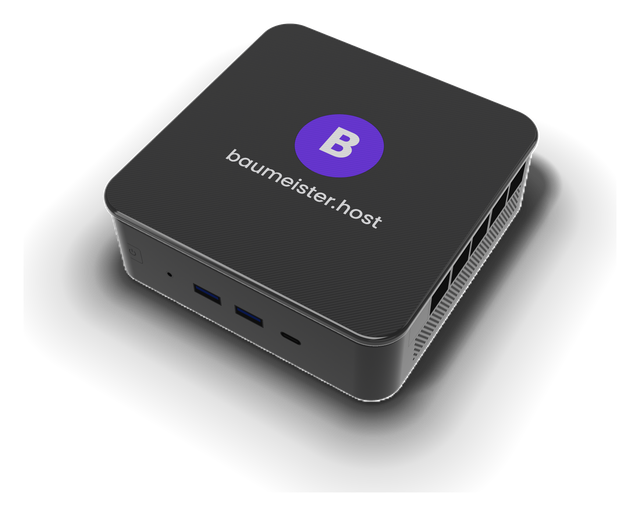
The Baumeister Private Server: a small black box with the purple Baumeister B and baumeister.host on top, two USB ports on the front
// specifications

A dedicated server, not a share of one.

Built for a single owner. No other customer's workloads run on it, and there are no monthly charges for compute, memory or storage.

Processor
Intel Core i3-1215U
2 performance + 4 efficient cores · 8 threads
up to 4.4 GHz · 10 MB cache · 15 W base power
Memory
16 GB
for applications, databases and sites
Storage
512 GB SSD
root volume expands to the full drive on first boot
Network
Gigabit Ethernet
wired connection to your router
Operating system
Debian 13
server edition, configured for Baumeister · sleep disabled
Runtimes
Python · Node.js
Python and Node.js applications, static sites
Ingress
Outbound tunnel
HTTPS at the edge · no port forwarding
Monitoring
Temperature, fans, drive health
reported on the Server page, with warnings for overheating and drive wear
Updates
Included, signed, with automatic rollback
only releases signed by Baumeister are installed · failed updates roll back automatically
// partner network · only on Baumeister hardware

Servers that look out for each other.

Choose how much space your server keeps for other owners, from 10 to 100 GB. In return, two other Baumeister servers each keep a backup half that size, encrypted before it leaves your server. If yours goes offline, one of them keeps your website up until it's back.

01 Every night
encrypted backup encrypted backup Partner 1 other network can't read it Partner 2 other network can't read it Your server encrypts first + holds space for others another owner another owner
02 If your server goes offline
Visitors yoursite.baumeister.host Your server offline power or internet out Partner 1 showing your site checked page by page back to your server when it's online
01

Encrypted before it leaves

The key stays on your server. Partners store pieces they can't read, and any tampering is caught.

02

Two copies, two networks

Always on other people's servers and networks. Your server checks both copies daily and replaces a partner that drops out.

03

Your website stays up

If your power or internet goes out, a partner shows your website for up to 72 hours a month, checked page by page against your own copy. Checkout buttons from Stripe, PayPal or Square keep working. Your server needs to be online at least 90% of the time to qualify.

04

Walled off

Other owners' backups are encrypted, and their websites are only ever shown, never run, so nothing of theirs can touch your files or your home network.

05

Easy to restore

Set up a new server with the same email, enter your recovery code, and your projects come back.

06

Free and optional

Included with every server. Give 10, 20, 50 or 100 GB and back up half that. Your server shows the first upload time before you choose.

// private home server vs. free software

What only the Private Server does.

The same Baumeister software runs on both. The Private Server adds these.

Private Server
Free software · on your own computer
Always onday and night
Always onRuns around the clock, off your everyday computer. Sleep is disabled.
Only while it’s onYour sites run while your computer is on and awake.
Backupif the machine is lost or breaks
AutomaticTurn on Partner Backup and it’s encrypted every night on two partner servers. USB too.
You keep itTo a USB drive, or to your other computer.
Hardware checkstemperature, drive health
IncludedWarnings for overheating and drive wear on the Server page.
Not includedDisk, memory and processor use only.

“What happens when it’s off?”

Our servers keep your projects up for free while yours is off.

Private Server
Free software · on your own computer
Basic pagesHTML, CSS and images
OnlineServed by Safety Net, or by a partner server, with every file checked against your own copy.
OnlineSafety Net (free) serves the latest published copy from Baumeister’s servers.
Websites with formscontact, booking and RSVP forms
OnlinePages are served by Safety Net or a partner server. Form submissions pause and resume when the server is back online.
OnlinePages are served from Safety Net. Form submissions pause and resume when your computer is back online.
AppsPython or Node, with sign-ins or a database
OnlineApps run around the clock on the server. During a power or internet outage, the apps you allow keep running on Baumeister’s own servers, with sign-ins and database writes, and every change comes back when your server is online.
Read-onlySafety Net serves a snapshot of the app’s public pages, taken as a signed-out visitor every 30 minutes while it runs. Sign-ins and database writes resume when your computer is back online.

Checkout buttons from Stripe, PayPal or Square keep working, because they run on those companies’ servers. Baumeister can email you when it’s been off for 15 minutes, and again when it’s back.

Try it free first. Download the software, build and publish on your own computer, and move to the Private Server when you want it always on.
// energy

Your power, not a data center's.

Data centers must remove the heat of thousands of servers around the clock. Cooling equipment, pumps and backup power systems all consume electricity before a single request is served.

  • On average, a data center draws about 1.5 watts for every watt its computing equipment uses. Roughly a third of its power goes to cooling and other overhead.
  • A single small server at home needs no dedicated cooling plant.
  • If your home runs on solar power or a renewable energy plan, your websites do too.
  • You own one compact machine for years, rather than renting capacity in a facility that runs continuously.
Processor base power15 W
Annual energy at 15 W, continuous131 kWh
Annual cost at the U.S. average residential rate~$25
Average data center PUE~1.5
Dedicated cooling requiredNone
4.4%of U.S. electricity was used by data centers in 2023
176 TWhconsumed by U.S. data centers in 2023
6.7–12%projected share of U.S. electricity by 2028

Data center figures: Lawrence Berkeley National Laboratory, 2024 United States Data Center Energy Usage Report. PUE (power usage effectiveness) is total facility power divided by the power used by computing equipment; the Uptime Institute's global surveys have put the average at about 1.5 for several years.

// cost

Pays for itself in months.

Compared with renting a cloud server with the same 16 GB of memory. Cloud prices shown are for compute only; storage, bandwidth and support are billed separately.

Baumeister Private Server
$399 one-time
16 GB · 8 threads · 512 GB SSD included
Electricity, per year*~$25
Year one$424
Three years$473
Cloud server (16 GB), average
$146 per month
4 vCPU · 16 GB · range $98–$225 per month
Storage and bandwidthbilled separately
Year one$1,750
Three years$5,250
$1,326saved in year one
$4,777saved over three years
$0monthly charges for compute, memory or storage

Cloud average: on-demand list prices for a 4 vCPU, 16 GB server at five major cloud and hosting providers (U.S. regions, Linux, October 2026), at 730 hours per month. Excludes storage, bandwidth, backups and support. *Electricity assumes the processor's 15 W base power continuously (131 kWh per year) at the U.S. average residential rate of 18.83¢/kWh (EIA, April 2026); actual draw at light load is typically lower. Home internet service is not included.

// security

Security at every layer.

Your websites are public. Your server is not.

01

No inbound ports

Sites are served through an encrypted tunnel initiated by the server. No router ports are opened or forwarded, and your sites' DNS records point to the tunnel rather than your home IP address.

02

Two-factor authentication

Administration requires your password and a single-use code from an authenticator app. A one-time recovery code covers a lost device, and forgotten passwords are reset through your recovery email.

03

No local-network sign-in

The server does not accept sign-ins from your home network. All administration goes through its own address and two-factor check, so other devices on your Wi-Fi cannot sign in.

04

Physical ownership check

Setup completes only after the power button on the unit is pressed, together with a single-use setup pass. Claiming a server requires physical access to it.

05

Signed updates

Each update is verified against Baumeister's release key before it is unpacked. The signature covers the version number, so an older release cannot be presented as a new one. Failed updates roll back automatically.

06

Automatic security patches

Debian security updates install automatically, keeping the operating system current without manual maintenance.

07

Unique to each unit

Each unit generates its own SSH host keys, machine ID and Baumeister identity on first boot. No secrets are shared between units.

08

No preinstalled access

Units ship with no SSH keys installed and password logins disabled. Administration is possible only through your own two-factor sign-in.

09

Isolated administration

Admin pages cannot be reached from your public sites, no other customer's code runs on the machine, and your data directory is readable only by the Baumeister service account.
Security practices and vulnerability reporting →
// faq

Frequently asked questions

Is there a monthly fee?

There is no monthly fee for the hardware. Three .baumeister.host addresses are included at no cost (the server's own address uses one), and connecting your own domains is always free. Lite and Pro plans add more addresses, as with the free software.

How is it set up?

Connect it to power and your router, open baumeister.host/setup on your phone, and press the power button once. No monitor, keyboard or router configuration is required.

What happens during a power or internet outage?

Your sites are unavailable until power and internet service are restored, unless Partner Backup is on: then a partner shows your websites (see what happens when it’s off). Once the server is running again, it reconnects your sites and applications automatically.

Is the hardware required to use Baumeister?

No. The software is free for Windows and Mac. The Private Server is intended for sites and applications that need to stay online without keeping your own computer running.

When will it ship?

The Baumeister Private Server is in stock in December 2026. The price is $399, a one-time purchase. Leave your email in the notify box to get a single email when it’s in stock.

Are software updates included?

Yes. Baumeister software updates are included at no additional cost for as long as you own the server, and they install automatically.

Stop renting servers.
Own one.

$399, one-time purchase. Hosted on your premises, on your power.

Notify me → Download the free software